
Small and mid‑sized restaurants often spend months tinkering with a website only to end up with a digital brochure that looks nice but doesn’t move the needle. In 2026, the bar is much higher. Diners browse from phones, expect to reserve a table or order take‑out in seconds, and abandon pages that load slowly or hide the menu behind PDFs. A site for restaurants isn’t about aesthetics alone; it’s the front door of your brand and the engine for predictable reservations, online orders, and loyalty.
This playbook breaks down what works across the best restaurant web pages and real restaurant website examples: must-have features (menus, booking, ordering), restaurant website design principles that convert, and the technical moves that protect performance.
You’ll also learn the local growth layer: local SEO and NAP consistency, Google Business Profile support, Restaurant schema, ADA/WCAG accessibility, and analytics tracking so you can measure conversions, not pageviews. We’ll close with an execution roadmap you can launch in weeks, not quarters.
UADV’s POV is direct: no fluff. You’ll get benchmarks, frameworks, and a launch plan you can execute in weeks, not quarters. Want the fastest path to wins? Get a free consultation or book a strategy call with UADV.
In 2026, high-converting restaurant websites win for one reason: they remove friction on mobile. That means fast load times, a layout built for thumbs, and one primary action above the fold, either “Reserve” or “Order Online.” If your homepage asks people to think, scroll, or guess, you lose bookings.
Business impact is direct. Clarity increases booked covers. Speed reduces drop-offs. Proof increases confidence, which supports bigger check sizes and repeat visits. People often ask: What makes a good restaurant website? The answer is clarity, speed, and proof.
Use this conversion stack as your baseline:
Also, measure success the right way. “Beautiful” only matters if it’s usable. Track outcomes like reservations, online orders, and email or SMS signups, not pageviews.
Your hero must immediately show cuisine, location, and hours, plus one action: “Reserve” or “Order Online.” Skip sliders. They slow performance and dilute attention.
Keep hero copy concise, 12 words or fewer, and move secondary actions into the navigation (Menu, Locations, Events), not beside the primary CTA. On mobile, add a sticky CTA bar and test contrast and tap targets so the button is easy to hit with a thumb.
Navigation should reflect diner intent, not internal restaurant categories. Use goal-based labels like:
Keep depth shallow. Everything bookable should be reachable within two taps. Add a persistent click-to-call phone icon during peak hours to capture guests who prefer calling.
Lead with one strong hero image or short video and keep it lightweight so it loads fast, ideally under a 2.5s LCP target. Then show three trust cues early, such as awards, press logos, or your Google rating.
Place social proof near the booking section, not hidden in the footer. Build accessibility basics from day one, too: readable contrast, accurate alt text on photos, and clear headings. That protects usability and improves the experience for every guest on mobile.
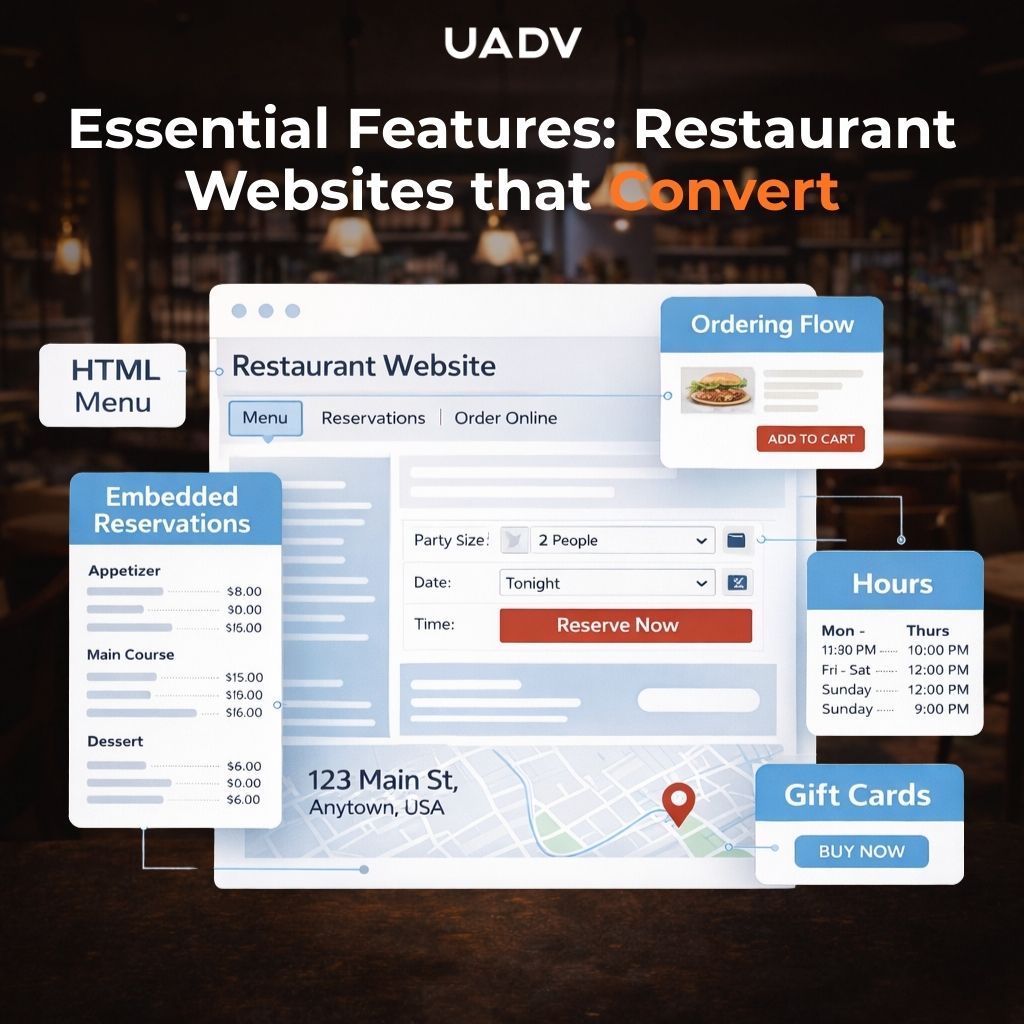
Every high-performing restaurant site setup comes down to one job: remove friction. People ask: “What should a restaurant website include?” The answer is the shortest path to reserve or order, plus accurate info that builds confidence.
The stakes are real because off-premises behavior is now habitual. In a National Restaurant Association release, two-thirds of Gen Z and millennials say takeout is essential to their lifestyle, and nearly 6 in 10 use takeout or drive-thru at least weekly. If your restaurant home page makes guests hunt for the menu, booking, or ordering, you leak revenue.
These are the non-negotiables your restaurant websites should surface clearly:
Proof matters as much as polish. A US Foods survey reports 3 in 4 people look at restaurant reviews before going out, and 79% say reviews impact their decision. That’s why trust signals should sit near booking and ordering, not hidden in a footer.
If online ordering matters to your revenue, push first-party ordering vs third-party delivery whenever feasible. First-party protects margin and keeps customer data. If you must use delivery partners, route guests through a branded landing page first so the experience still feels like you.
Want quick wins on your current setup? Check out our guide on restaurant marketing.
PDF-only menus slow guests down and hurt accessibility. A good restaurant website uses HTML menus with:
Feature signature items with photography and quick labels like “Seasonal,” “Chef’s pick,” or “Most-loved” so guests can decide faster. You can still offer a downloadable PDF, but treat it as a backup, not the main menu experience.
Your reservation flow should keep guests on the page and move fast. Embed OpenTable/Resy or native booking online and avoid new-tab detours that break intent.
To tighten the flow:
If you want Google to understand your business details better, use structured data. Google explains how Local Business structured data helps communicate info like hours and more.
Online ordering should feel effortless:
For revenue spikes, gift cards matter. Promote e-gift cards above the fold in the two weeks before major holidays and make redemption easy online. If you run loyalty, connect ordering to your CRM so repeat visits and remarketing aren’t guesswork.
For paid growth support, pair ordering with targeted campaigns.
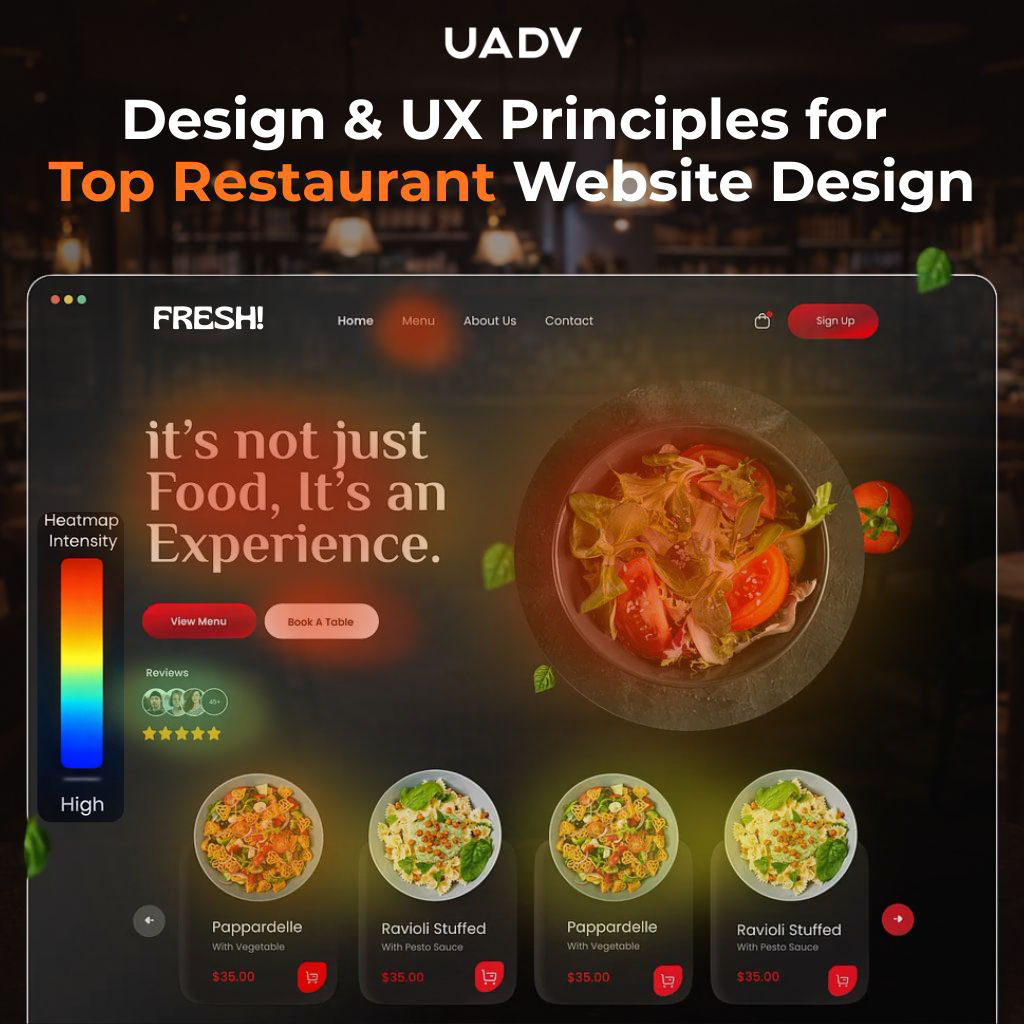
Examples are useful because they show patterns that consistently drive outcomes: clarity, speed, and brand consistency. They are not templates to copy. The goal is to borrow the structure that converts, then express it through your own concept, cuisine, and guest experience.
The best sites usually share the same signals:
Your restaurant websites should feel like the dining room before guests ever arrive. Lighting, texture, and pacing should inform the choices you make with color, typography, spacing, and motion. A high-energy taco concept can handle brighter contrast and punchy sections. A fine dining brand usually converts better with restraint, whitespace, and slower visual pacing.
Accessibility and readability are non-negotiable. Use type at 16px or larger, keep buttons high-contrast, and be disciplined with animation. People do not visit restaurants' sites to admire transitions. They visit to decide fast, reserve, and order.
Use one decisive hero image and treat it like your billboard. Serve it in WebP or AVIF, compress aggressively, and lazy-load everything below the fold. Web.dev notes a “good” Largest Contentful Paint target is 2.5 seconds or less, measured at the 75th percentile of page loads.
Shoot vertical assets so they can double as mobile hero visuals and social content (Reels). Avoid auto-play audio. Keep video loops short and silent so they support the vibe without slowing the experience.
Style dishes consistently across photos: similar backgrounds, lighting, and plating angles. That consistency improves scannability, and it also helps alt text stay accurate for accessibility and search understanding.
Use verb-led links that match diner intent: “View Menu,” “Reserve Table,” “Order Now,” “Private Events.” Keep labels consistent site-wide and avoid clever naming that forces guests to guess.
Add reassurance near CTAs where it reduces hesitation: secure booking, easy changes, typical wait time, or “no prepayment required” if true. Also keep motion disciplined because responsiveness matters. Web.dev explains that INP measures responsiveness and “good” INP is 200ms or less (with higher values indicating the page needs improvement).
If you run multiple locations, remove the “wrong location” problem fast. Auto-detect the nearest location, but always let users switch easily. Show map tiles and hours inline so guests do not have to hunt.
Keep menus scoped to each location and display day-part availability or sold-out status when it applies. Add practical details that prevent friction: parking or valet notes, ride-share pins, and transit tips for each venue. The goal is simple. Fewer questions mean more bookings.
Start by mapping keyword intent to the pages you actually need. Broad terms like restaurant websites, top restaurant websites, and restaurant web design fit an informational hub or blog content. High-intent terms like cuisine + city pages and “near me” belong on location pages and menu/reservations pages that convert.
The answer to ranking locally is consistent NAP, strong location pages, and structured data that makes your business details easy to understand and trust.
To capture long-tail traffic, build focused pages for the things guests search around specific moments: seasonal/event pages (Valentine’s, brunch, NYE), private events, tasting menus, and chef features. These pages don’t just rank, they also convert because they match intent.
Create clear hubs and interlink them thoughtfully: Menu, Reservations, Private Dining, Events, Gift Cards, Catering. Add 150–200-word intros to menu pages, so they’re indexable (avoid image-only pages). Then add FAQs that answer “hours,” “dress code,” “parking,” and dietary tags.
This isn’t busywork. Click opportunity is concentrated at the top. Backlinko’s CTR research shows the #1 result is 10x more likely to get clicked than the page in the tenth spot.
Local SEO is built on NAP consistency. Your name, address, and phone must match across your site, footer, and Google Business Profile. Add an embedded map and driving directions, then mark up addresses and hours with Local business / restaurant schema.
Google’s documentation is explicit that Local Business structured data helps you tell Google about details like business hours and more.
Also, keep your GBP content fresh and measurable:
Earn links that make sense for restaurants: local “best of” lists, chef interviews, event sponsorships, and community collaborations. Publish photo-worthy guides that people actually share and cite (neighborhood brunch maps, cocktail crawls, chef’s tasting walkthroughs). Then leverage partnerships (farms, wineries, local suppliers) for reciprocal bios and links.
The goal is steady authority growth that supports your most valuable pages: location, reservations, menu, and events.
If you want an SEO system built specifically for restaurants, check out our restaurant SEO guide.
Speed is conversion protection. Core Web Vitals are the baseline for page experience: LCP measures how fast your main content loads, CLS measures visual stability, and INP measures responsiveness to taps and clicks.
“How fast should a restaurant website be?” The answer: pass Core Web Vitals on mobile at the 75th percentile of real user data.
That requires a “script diet” and performance discipline:
Web.dev documents the “good” targets clearly: LCP ≤ 2.5s at the 75th percentile, INP ≤ 200ms, and CLS ≤ 0.1.
Use PageSpeed Insights (PSI) and CrUX field data to see real performance, then monitor Search Console’s Core Web Vitals reports so you catch issues before they cost bookings. (PSI + CrUX are referenced as measurement workflows on web.dev’s CWV resources hub.)
Serve the hero as AVIF or WebP with width-specific sources, and preload the hero plus your primary font. Limit font weights and remove unused variants so text appears fast and stable.
Lazy-load below-the-fold images, defer non-critical JavaScript, and use a CDN with cache rules that match your menu update cadence. Menu changes often, so cache smart, not forever.
Audit booking and delivery widgets, analytics, chat tools, and social scripts. Remove duplicates and eliminate render-blocking scripts, especially above the fold.
Replace social embeds with static images and links, then load the actual embed only on interaction. After each change, track INP impact because responsiveness is where “death by widgets” shows up first. A good INP is 200ms or less, while values above 500ms indicate poor responsiveness.
Also, watch the layout stability. A good CLS score is 0.1 or less, and higher scores indicate layout shifts that hurt usability.
Create a pre-launch CWV checklist and ship it to staging first. Test with Lighthouse and PageSpeed Insights, then validate again after you add booking and ordering scripts.
Set up Search Console CWV monitoring, review weekly, and tie performance sprints to your calendar, especially before holidays and restaurant week when traffic spikes. Continuous monitoring keeps “it used to be fast” problems from quietly killing conversions.
Accessibility is revenue protection and inclusivity. If a guest can’t read your menu, use your booking flow, or complete an order with a keyboard or screen reader, you lose the sale, and you increase legal risk. Also, PDF-only menus create friction for both accessibility and search visibility.
Bake accessibility checks into QA, not as an afterthought:
Start with the fundamentals that improve usability immediately:
Make reservation and ordering flows keyboard-navigable with visible focus indicators. For forms, use real labels (not placeholder-only), add aria-live regions for booking feedback (“Table confirmed,” “No availability”), and provide CAPTCHA alternatives so guests aren’t blocked.
Provide HTML menus first for accessibility and SEO. Attach PDFs only as a supplement for guests who prefer downloads.
Use structured sections and filter chips for dietary needs (vegan, gluten-free, nut-free), and announce price changes clearly so screen readers do not miss critical info. A clean HTML menu is one of the highest-leverage accessibility upgrades you can make for a restaurant site.
First-party ordering is not just about commissions. It’s about owning the customer relationship, the data, and the ability to drive repeat visits. Toast’s guidance on restaurant websites emphasizes building guest relationships by capturing customer data during ordering (email, loyalty signups) so you can re-engage guests later with offers and updates.
Connect reservations, ordering, gift cards, and loyalty into your POS and CRM so you can model lifetime value and segment campaigns based on real behavior. Add email and SMS capture at checkout and on site, honor consent, and send value-driven messages (chef notes, drops, event invites), not spam. If your stack supports it, use webhooks so orders and reservations flow into BI dashboards for reporting and forecasting.
Prioritize integrations that reduce friction and keep data clean:
Track reserve and order conversion using GA4 events, and implement server-side tagging where possible so attribution stays reliable. Google’s documentation covers how structured data can support actions and visibility for local businesses, and it pairs well with conversion tracking when your site keeps guests in a clean booking or ordering flow.
Use UTM parameters on GBP, social, and email links so you can attribute revenue to channels inside GA4. Then review cohort retention: compare repeat behavior and purchase frequency from first-party orders versus third-party delivery customers and let that data guide where you invest next.
A restaurant content system is not blogging for the sake of it. It’s a simple matrix that matches how guests search and how you want them to convert. Build pages for:
To keep the system alive, publish “What’s New” updates. These feed Google Business Profile posts and give you high-value email content, new menus, seasonal specials, live music nights, chef collaborations, and limited drops.
Private dining is high-intent traffic and often high-margin revenue. Create dedicated pages that clearly show capacities, floor plans, prix fixe options, and an inquiry form built for speed.
Add a response SLA (“We reply within 24 hours”) so leads don’t go cold. Feature testimonials and photo galleries from past events, and if you run weekday minimums, state them clearly to reduce back-and-forth. During event season, interlink these pages from the homepage hero so corporate planners and hosts hit the right page in one click.
Seasonal experiences spike search demand and convert fast when the details are clear. Build evergreen URLs (for example, /valentines-day-miami) and update them annually instead of creating a new page every year.
Include prix fixe menus, seating windows, and deposit policies. When applicable, add structured data for events so search engines can understand the page context better. Tie these pages into email and GBP posts so guests get the same message across every channel.
Website redesigns don’t have to take all quarter. Restaurant owners often ask, “How long does it take to build a top restaurant website that actually converts?” For a single-location restaurant, a realistic timeline is 6–10 weeks when stakeholders move quickly, feedback is clear, and approvals don’t get stuck in limbo.
Here’s a realistic plan you can execute without chaos:
audit → wireframes → content → design → build → QA (CWV/WCAG) → launch → iterate
Budget depends on complexity. A single-location site with a standard stack and embedded booking will cost less than a multi-location brand that needs first-party ordering, gift cards, and a private dining (PDR) module.
Marketing should be treated like an investment, not a line item to minimize. The goal isn’t “a cheaper website,” it’s a site that returns more covers, higher order volume, and better private dining leads month after month. When you budget based on expected outcomes, it becomes easier to justify the work that actually moves revenue.
Two areas deserve upfront investment because they pay back the fastest: photography and copy. Reserve time for redirects, schema, and analytics QA too. If those are skipped, you risk traffic loss, broken pages, and reporting that can’t prove what’s working.
Plan a 30-day optimization sprint focused on Core Web Vitals, INP, and funnel friction. Then keep improvements on a predictable cadence:
Continuous improvement keeps your site fast, usable, and profitable as menus, promos, and guest behavior change.
The formula is straightforward: fast mobile UX + clear CTAs + local SEO + accessible flows + measurable analytics. When your restaurant home page makes “Reserve” or “Order” obvious, your menu is easy to scan (HTML-first), and your site stays fast and stable on mobile, you stop leaking bookings and start compounding results.
The multiplier is hiring the right marketing agency for your situation. A great partner doesn’t just “make it pretty”; they pressure-test your offer, tighten your conversion paths, instrument the site (calls, reservations, orders), and run local SEO like an operating system: Google Business Profile, location pages, schema, reviews, and content that matches real search intent. The best agency fit is the one that understands restaurants, moves fast with your team, and can prove impact with numbers, not vibes.
Why continue wasting more time and money on marketing strategies that don't work? Your business deserves better marketing. Say goodbye to empty promises and half-ass results; UADV is the only full-service marketing agency that grows your business (no excuses). Get a free consultation with our expert team now!
A great restaurant website is built to convert quickly. Use a fast homepage with one primary CTA: Reserve or Order. Include HTML menus, embedded reservations, online ordering, hours, address with map, gift cards, and clear contact options. Add event and private dining pages if relevant too.
A PDF should not be your main menu. Publish an HTML menu so Google can crawl it, and guests can read it on mobile. HTML is better for SEO, accessibility, and quick updates. Offer a PDF as an optional download for people who expect it.
Start with a complete Google Business Profile: correct category, hours, services, and photos. Keep NAP consistent across directories. Build unique location pages with LocalBusiness/Restaurant schema, embedded map, and local details. Earn real reviews, respond to them, and keep mobile performance fast.
Fast enough means passing Core Web Vitals on mobile at the 75th percentile. Aim for LCP at or under 2.5 seconds, INP at or under 200 milliseconds, and CLS under 0.1. Track results in Search Console and PageSpeed Insights, then fix regressions quickly.
Aim for WCAG 2.2 AA as your baseline. Make sure menus, navigation, and booking or ordering flows work with keyboard-only input and screen readers. Use sufficient color contrast, label form fields clearly, provide captions where needed, and write accurate alt text for images.
{
"@context": "https://schema.org",
"@type": "Article",
"headline": "Sites for Restaurants: Best Examples, Design, & Features to Drive Reservations",
"url": "https://www.uadv.net/blog/sites-for-restaurants-design-examples",
"description": "Struggling with ad fatigue? Get the diagnostics, platform tactics, and creative rotation cadence UADV uses to cut waste and lift performance across channels.",
"author": {
"@type": "Organization",
"name": "UADV",
"url": "https://www.uadv.net"
},
"publisher": {
"@type": "Organization",
"name": "UADV",
"url": "https://www.uadv.net"
},
"datePublished": "2026-02-11",
"image": "https://cdn.prod.website-files.com/5cb75bcc61ced2b111495666/698b918a90ccbd101414abc3_Sites%20for%20restaurants.jpg"
}
.webp)
Our team will compare you to your biggest competitors in your industry across multiple points from SEO to social media so you can find strengths & weaknesses in your business.


